
iPhone app · In beta

Chronic illness is draining. Let Trace do the tracking.

Take control of your health, one entry at a time. Say or type how you feel, and Trace does the rest: it keeps your journal, shows when things trend up or down, and summarizes how you’ve been feeling, for you or your doctor.

Free during the betaSign in with Apple

Made by David, who lives with Crohn’s disease. Read why →

Already testing Trace? Open the tester guide →

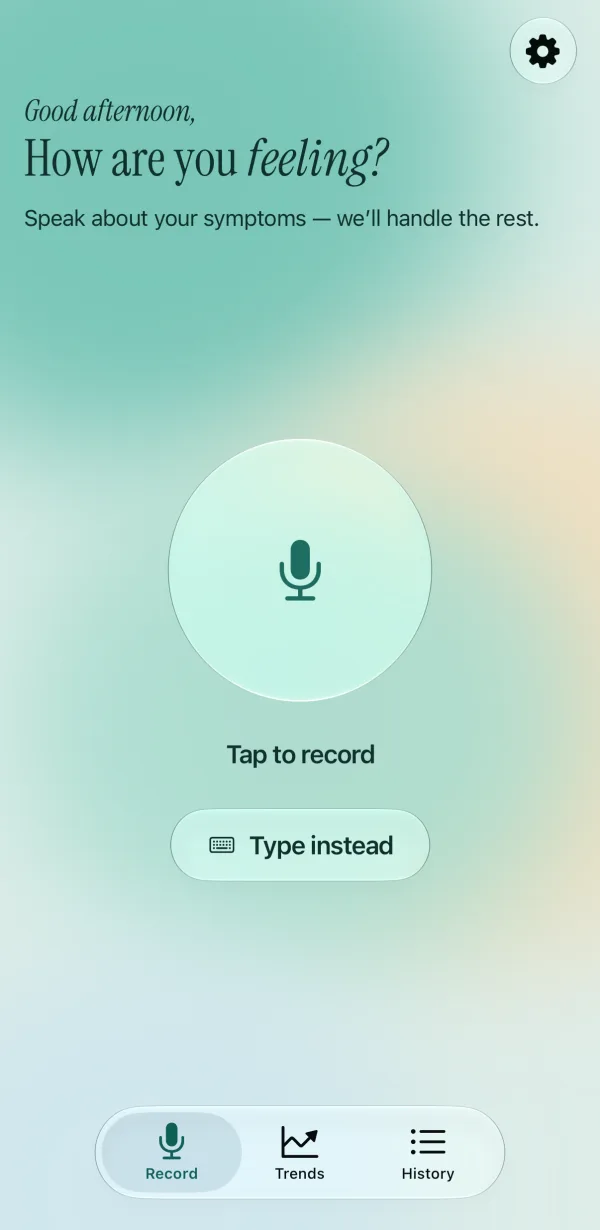
Trace’s Record screen. “How are you feeling?” sits above a glowing record button, with “Tap to record” and “Type instead” below it.

The problem

The days you most need to track are the days you least can.

Living with a long-term condition means keeping track of how you feel. Most ways of doing that ask the most of you at exactly the wrong time.

  1. Tracking stops on bad days.

    Sliders and forms are easy on a good day. In a flare, they’re one more chore, so the record goes quiet when it matters most.

  2. Memory blurs.

    When you’re unwell, days run together. By the time someone asks how the last month has been, it’s hard to say.

  3. Appointments are short.

    You get a few minutes to explain weeks. Without the full picture, your doctor can’t give you the best advice.

How it works

A minute a day, even on bad days.

You see what’s changing, and your doctor sees the whole picture, not only what you remember in the room.

  1. Step 01

    Speak, or type

    Tap once and say how you’re feeling, the way you’d tell a friend: what hurts, how tired you are, how you slept. If you’d rather not talk out loud, tap Type instead.

    Apple’s speech recognition turns your voice into text. Trace keeps the text, never the audio.

    What you said

    “Slept about six hours, woke up once. Some cramping this morning, maybe a four, but it settled after a walk. Energy is okay and I’m in a decent mood.”
    Pain 4 Energy 6 Mood 7 Sleep 6
  2. Step 02

    Check the scores

    Trace reads what you said and suggests a score from 0 to 10 for pain, energy, mood and sleep. Drag any score, or tap − and +, then save. It’s your record, and you have the last word.

    If you didn’t mention something, it stays blank. Trace never fills a gap with a guess.

  3. Step 03

    See how things change

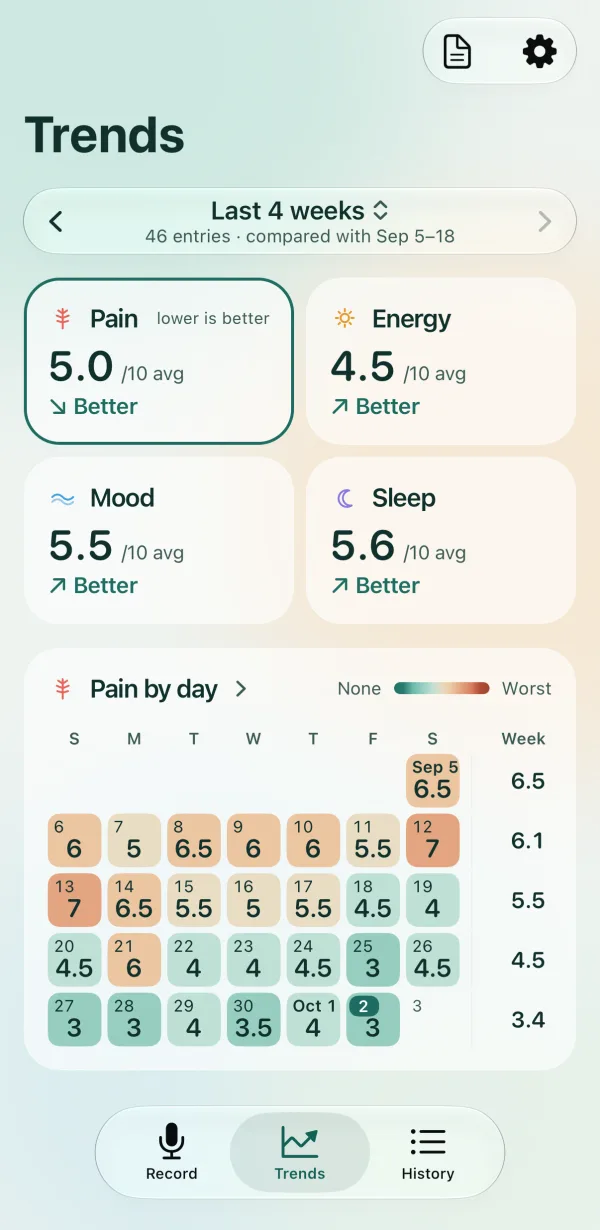
    Trends shows your month at a glance: how each measure is moving (better, worse or steady) in plain words, and a calendar coloured by how each day went. Tap a day for its score, or switch to a week or three months.

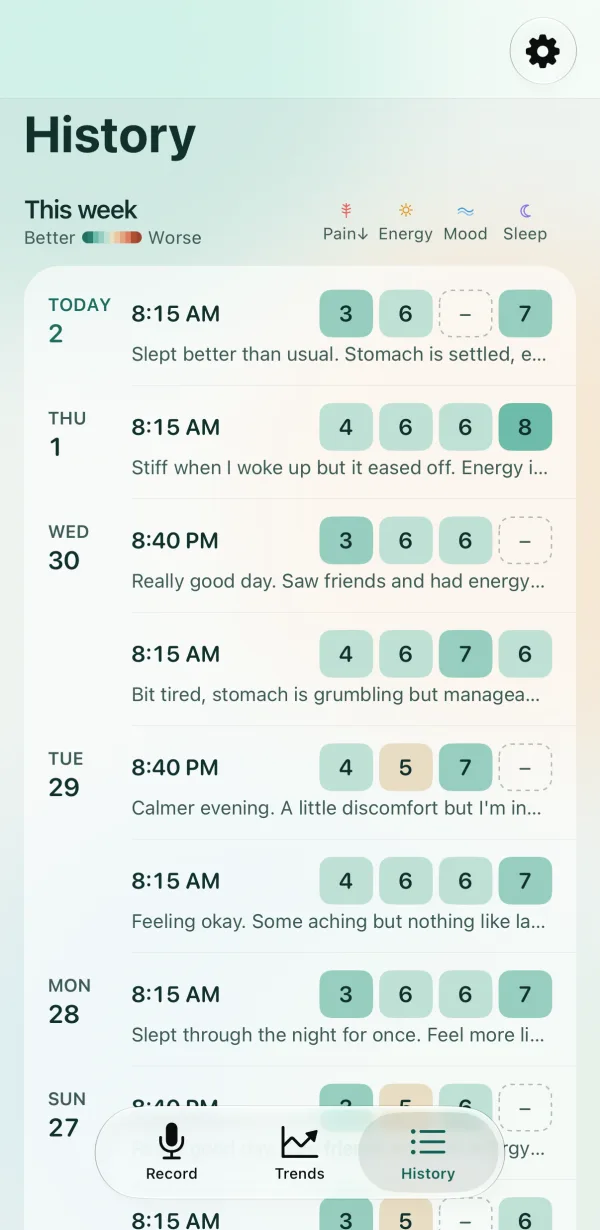
    History keeps every entry, grouped by day and week, with its four scores at a glance and the start of what you said.

    A pattern is easier to see on a screen than to remember in a waiting room.

    Trace’s Trends screen. Pain, energy, mood and sleep each show an average and a plain-language trend such as “Better” or “Steady”.
    Trace’s History screen. This week’s entries, each with its time, four colour-coded scores and the start of what was said.
  4. Step 04

    Generate a brief

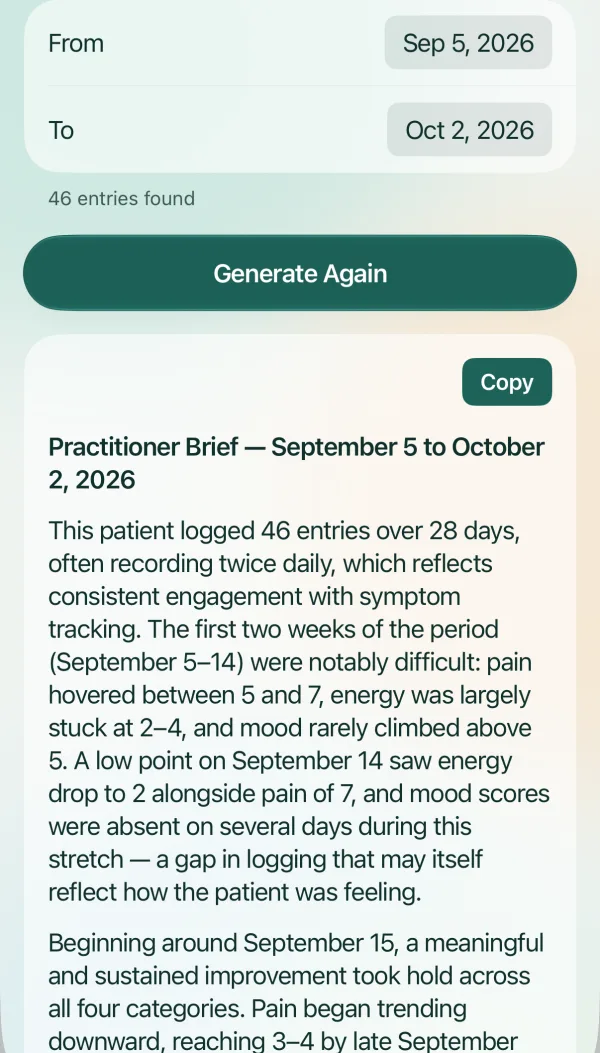
    Pick a date range and tap Generate Brief. Trace drafts a Practitioner Brief: a short summary for your appointment, with your usual levels, the spikes and what you said about them, and any stretches you didn’t log. Share it as a PDF with your care team, read from it at your visit, or keep it as a look back at how things have been.

    AI writes the brief from what you’ve logged. It can get things wrong, so read it before you share it.

    Practitioner Brief

    “The first two weeks of the period (September 5–14) were notably difficult: pain hovered between 5 and 7, energy was largely stuck at 2–4, and mood rarely climbed above 5.”

    “Beginning around September 15, a meaningful and sustained improvement took hold across all four categories.”

    For personal review or to share with your practitioner & care team

    Excerpt from a sample brief.

  • Daily reminder. One quiet notification a day, at a time you choose. Turn it off whenever you like.

  • Works offline. Entries save on your phone and back up when you’re connected. Offline, you set the scores yourself.

  • Backed up to your account. Sign in with Apple, and your journal follows you to a new iPhone.

  • Export any time. Save a copy of everything you’ve logged, and bring it back in whenever you like.

What Trace tracks

Four measures, whatever the diagnosis.

Crohn’s, arthritis, IBS, migraine, long COVID, ME/CFS, fibromyalgia, or something that doesn’t have a name yet: Trace doesn’t ask for a diagnosis, or give one. It keeps a steady record of how you actually feel, in your own words, so the pattern is there when you need it.

Why Trace exists

The app I wished I’d had at my worst.

I’m 26, and I’ve had Crohn’s disease since college.

Before Crohn’s, being sick was temporary. A sore throat, a cough for a week or two, then back to school, back to work. Then a stomach ache just didn’t go away. Two weeks. Three. One month, two, three. I got worse. I was commuting an hour or more each way to college, in pain, barely sleeping, late to everything.

I needed to keep track of how I was feeling. But I didn’t have the bandwidth for a spreadsheet, a notebook, or my notes app. The best I could do was say it out loud, to my parents or to my doctor.

Saying it out loud is exactly the idea.

I still use Trace every day, and I’ve come a long way with my health. I can’t choose when a flare comes, but I’m in control of the record: the dates and details are already there for my doctor, so I’m not relying on memory.

If I found it useful, perhaps others will too. That’s why Trace is in testers’ hands now: so people who live with this every day can tell me what works, what doesn’t, and what Trace should become.

David Grenader, founder

Investors, mentors, clinicians, anyone curious: write to me at david@tracejournal.life. I’d love to talk.

Your data

Straight answers about your data.

What we promise

  • Your data is never sold.
  • Save a copy of everything you’ve logged, whenever you like.

What to know

  • Your entries are stored on Trace’s servers and used to improve Trace.
  • Trace uses Anthropic’s Claude to suggest your scores and write your briefs.
Read the full privacy policy →

The beta

Help decide what Trace becomes.

Trace is a working iPhone app, in a small, invite-only beta. It’s simple on purpose right now. I’m looking for people living with chronic illness to use it for about three weeks, in their real lives, and tell me what works, what doesn’t, and what they’d want it to do.

What joining involves

  1. An iPhone, being 18 or over, and living in the US or Canada. After you sign up, I email you the invitation with the setup steps.
  2. About three weeks of using Trace, whenever and however it suits you. A minute or less a day; missed days are fine.
  3. Telling me what’s useful, what’s confusing, and what you wish it did, any way you like: text, email, a call, a video chat.
  4. A 20-minute chat with me at the end. That conversation is the most useful part of the beta for me.

No iPhone, or not ready yet?

FAQ

Questions, answered.

Something else? Email hello@tracejournal.life.

Who is Trace for?

Anyone living with a long-term condition who wants a simple, steady record of how they feel. You don’t need a diagnosis to use it.

Do I have to talk out loud?

No. Tap Type instead and write it. Trace scores typed entries the same way.

Is Trace free?

Yes, during the beta. If that changes later, I’ll say so clearly before it affects you.

Is there an Android version?

No. Trace is iPhone only for now.

Is this medical advice?

No. Trace is a journal. Its scores, trends and briefs are generated automatically from what you tell it. They can be wrong, and they aren’t a diagnosis or a treatment recommendation. Talk to a qualified clinician about your health.

Does Trace record my voice?

No. While you’re recording, Apple’s speech recognition turns what you say into text. Depending on your device and settings, Apple may process that audio on its servers to do so. Trace keeps only the text, never the audio.

Who can read my entries?

You and, during the beta, the Trace team, to improve the app. Anthropic’s Claude also processes them to suggest scores. Other people using Trace can’t see anything you log.

Can I skip days?

Of course. Trace leaves gaps as gaps and never fills them in. The brief notes any stretch you didn’t log.

What if I want to leave?

Save a copy of your data from Settings first if you want it, then delete your account there. That removes everything you’ve logged.