Trace beta
Thanks for trying Trace.
You’re one of the first people to use it. This page has everything you need to take Trace for a spin.
David
Get started.
You’ll need: an iPhone and five minutes.
Part 1 Install Trace.
- Find the invitation.It’s an email from david@tracejournal.life with your TestFlight link. Not in your inbox? Check your spam folder. Still nothing? Email me and I’ll send it again.
- Install TestFlight from the App Store.It’s Apple’s free app for trying apps before they’re released.
- On your iPhone, open the TestFlight link in the invitation.Then tap Accept and Install.
Part 2 Sign in.
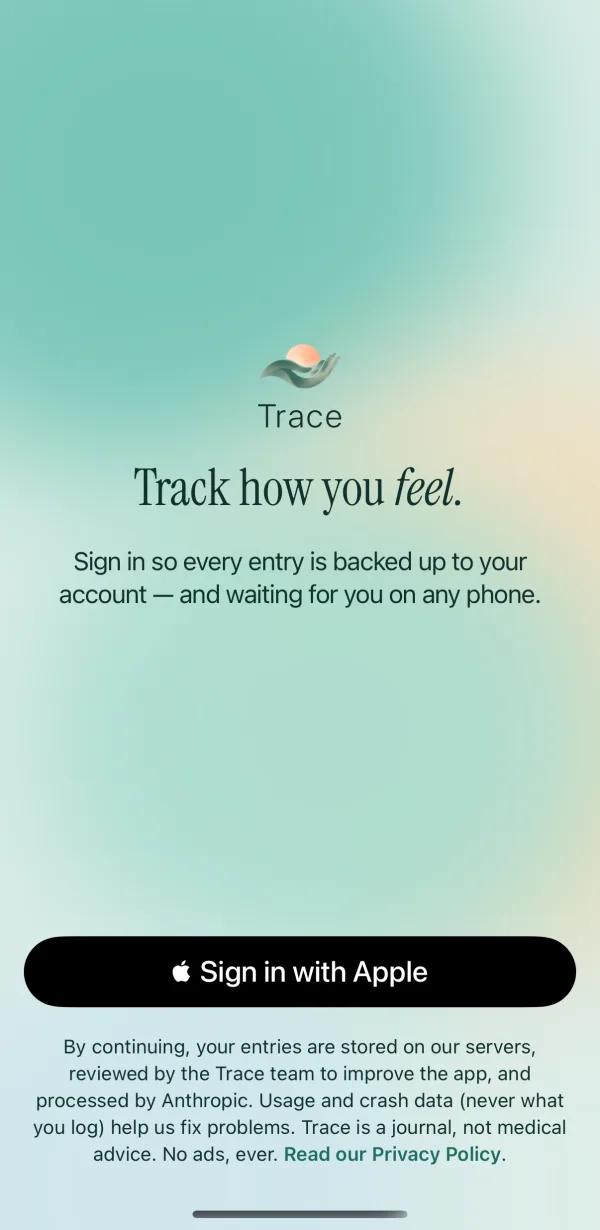
- Open Trace and tap Sign in with Apple.You can choose to hide your email. The small print under the button says what happens to your entries.
That’s it. Start using Trace. What to try, below, has ideas if you want them.
TestFlight tells you when there’s a new build. Turn on Automatic Updates for Trace in TestFlight and you’ll always have the latest.
Stuck on any step? Text me, or email me, and I’ll walk you through it, on a call if that’s easier.
A two-minute hello.
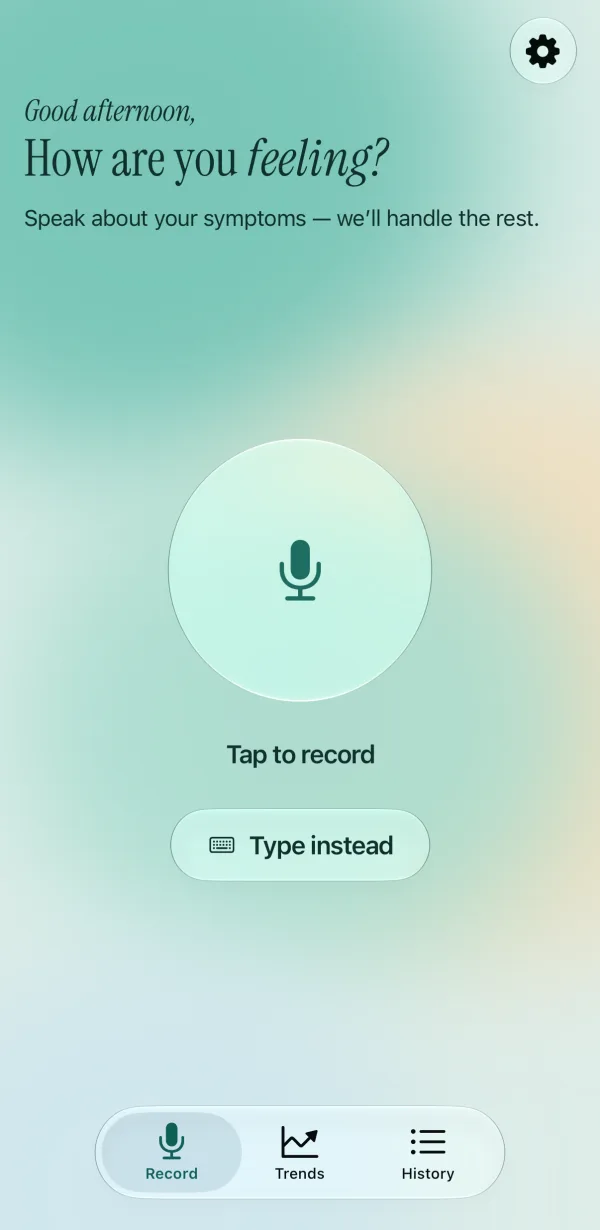
Say how you’re feeling, or type it. Trace suggests scores for pain, energy, mood and sleep; you check them and save. Trends shows how things are changing, History keeps every entry, and a brief turns any date range into a summary for an appointment, or for you.
What I’m asking.
Three things, whenever and however it suits you.
- Use Trace for about three weeks, on good days and bad. A minute or less a day is enough, and missed days are fine.
- Tell me what works, what doesn’t, and what you wish Trace did. Any channel, any length.
- A 20-minute chat with me at the end, by video or phone. This is the part I’m counting on most.
Halfway through, I’ll check in once. When a new build changes something you’d notice, I’ll tell you what’s different.
Not sure where to start? Try these.
Use Trace however you like. These are optional starting points, not a checklist. Skip any of them, or tell me about something that isn’t here. Any feedback, in any form, counts.
Trace is simple on purpose right now: four scores, a few screens, a brief. That leaves room for what you’d want it to be. Each idea ends with a question I’d love your answer to.
- Record on a bad day. Tap the button and talk, even if it’s three words, or tap Type instead. Did talking work when you felt rough? When did you reach for typing instead?
- Check the scores before you save. Drag any you disagree with. Do Trace’s suggestions match how you felt? Which one is off most often?
- Open Trends after a week. Tap a measure to see it day by day. Does it tell you anything you didn’t already know? What do you wish it showed?
- Make a brief. On Trends, tap the document icon at the top right, then Generate Brief. Would you hand it to a doctor, send it to someone, or keep it for yourself? What would make it more useful?
- Notice when you open Trace, and when you don’t. What made you reach for it? What got in the way on the days you didn’t? Try the daily reminder (Settings → Reminders → Daily reminder): does it help, or nag?
- Tell me what Trace doesn’t track. Pain, energy, mood and sleep are a starting point. What would you add for your own life: a specific symptom, a trigger, your cycle, stress, something only you would think of? And how would you want to log it?
- Bring me one idea. A feature, a change, a different app altogether. What would make Trace something you keep using after the beta?
Talk to me, any time.
Stuck on setup? Not sure what a screen is for? Would you rather tell me what you think than write it down? Let’s get on a video call. Pick a time below, or text or email me and we’ll find one that suits you, evenings and weekends included.
I’ll help you set up, explain any feature, or listen to whatever you want to tell me. The booking comes with a video link that opens in your browser. Rather FaceTime or a phone call? Say so. If you’re up for it, share your screen and use Trace while we talk. Watching where you tap first teaches me a lot.
Or send feedback any way you like.
Whatever’s easiest for you, whenever it comes to mind. One sentence or a screenshot counts.
-
Text or call
My number is in the invitation.
-
Email
-
In the app
Settings → Send feedback opens an email with your app version filled in.
-
The form
Five short questions, if you like a prompt. Open the form →
-
Discord
A small space for testers to compare notes and talk to me.
The form asks
- What were you doing, or trying to do?
- What worked, or was useful?
- What didn’t work, felt off, or was confusing?
- What do you wish Trace tracked, or did?
- Anything else?
To point me at an entry, its date and time is enough: I can see it from there. The form is a Google Form, so Google stores your answers.
If something breaks: take a screenshot (side button + volume up) and text or email it to me with a line about what you were doing. That’s the whole bug report.
Beta FAQ.
Not here? Text or email me.
- Where’s the brief? On Trends, the document icon at the top right, next to the gear.
- Where’s Settings? The gear at the top right of Record, Trends and History. Reminders, Send feedback, and saving a copy of your data are there.
- The scores look wrong. They’re suggestions. Drag them to change them before you save, and tell me when they’re off: that’s one of the things I most want to know.
- Can I change a score after saving? Not yet. Tell me if you want to.Yes. In History, tap the entry, then Edit.
- No connection? Your entry still saves. Trace needs a connection to suggest scores, so offline you set them yourself.
- Voice keeps mishearing me. Voice recognition is set to US English. Tap Type instead, and tell me what happened.
Your data, briefly.
- Your entries are stored on Trace’s servers, never sold, and used to improve Trace. A new phone doesn’t lose them.
- Trace uses Anthropic’s Claude to suggest your scores and write your briefs.